

- Question-based fields: Capture whether something happened in the conversation.
- Entity fields: Capture specific values mentioned in the conversation.
- Automating data collection for analytics and reporting
- Facilitating compliance monitoring and quality assurance
- Populating CRMs and other business tools efficiently
- Supporting data-driven decision-making and process improvement
To design fields, add them in AI Console, and access the extracted data, see Creating and Retrieving Structured Data.
Structured data forms
- Question-based fields
- Entity fields
These capture whether something happened in the conversation.Examples
- Was the issue resolved?
- Did the customer ask for a supervisor?
- Did the agent offer a refund?
- Yes
- No
- Not Found — when the particular information is not available in the transcript
- Empty transcripts — when the transcript is void of customer-agent utterances
- Unresponsive customer — when any customer responses are missing from the transcript
How it works
Here’s an example conversation to demonstrate how Structured Data works:Agent: Hello, thank you for contacting XYZ Insurance. How can I assist you today?AI Summary analyzes this conversation and extracts structured data in two ways:
Customer: Hi, I want to check the status of my payout for my claim.
Agent: Sure, can you please provide me with the claim number?
Customer: It’s H123456789.
Agent: Thank you. Could you also provide the last 4 digits of your account number?
Customer: 6789
Agent: Let me check the details for you. One moment, please.
Agent: I see that your claim was approved on June 10, 2024, for $5000. The payout has been processed.
Customer: Great! When will I receive the money?
Agent: The payout will be credited to your account within 3-5 business days.
Customer: Perfect, thank you so much for your help.
Agent: You’re welcome! Is there anything else I can assist you with?
Customer: No, that’s all. Have a nice day.
Agent: You too. Goodbye!
- Entity
- Question
Entity Extraction automatically identifies and extracts specific information from conversations. Extracted entities can include claim numbers, account details, dates, monetary amounts, and more.For the example conversation above, the extracted entities would look like this:
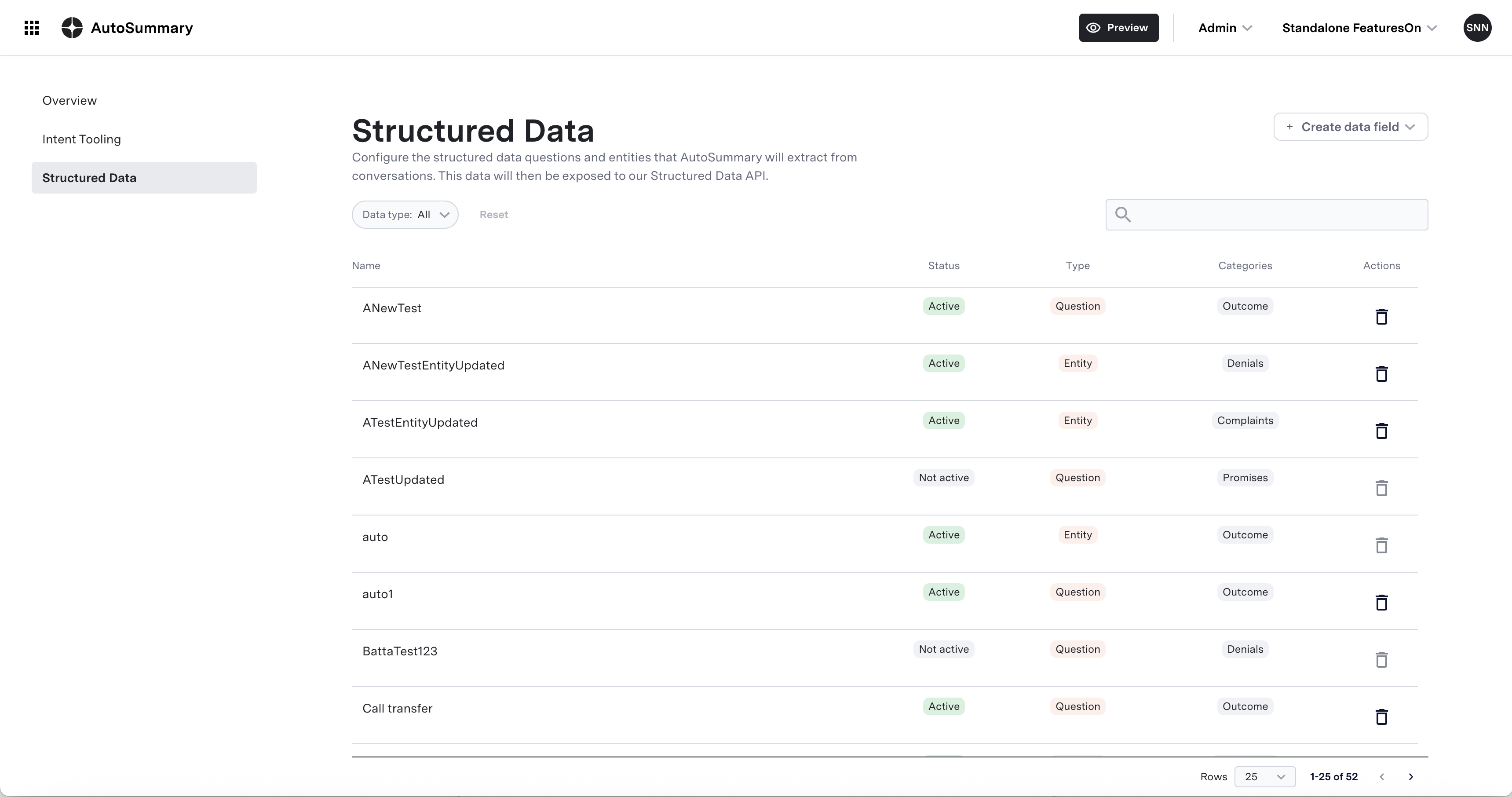
Structured Data dashboard
Use the Structured Data dashboard to configure which entities or questions you want to extract. Once configured, ASAPP will return the extracted structured data. The Structured Data dashboard enables you to:- Add new entities: Define fields to extract from conversations, such as order numbers, dates, amounts, or other relevant data points.
- Add new questions: Create targeted questions to answer based on conversation content. Tailor these questions to your specific use cases, including compliance checks, behavioral insights, or downstream workflows.
- Modify or delete existing entities and questions: Rename, change types, or update parameters for existing entities or questions to better suit your requirements. Remove any entities or questions that are no longer needed.
- Control visibility and lifecycle: Enable or disable fields based on team, workflow, or environment.
- Preview changes: Preview and validate extraction behavior before publishing.
Common types of structured data
A strong Structured Data design usually includes a mix of the following:Binary questions
Binary questions
Questions answered with Yes/No.Examples
- Did the customer mention a competitor?
- Did the agent offer a promotion?
- Did the customer request escalation?
Entity fields
Entity fields
Fields that capture a specific value.Examples
- Competitor name
- Transaction date
- Refund amount
- Plan of interest
- Product model
Not Found values
Not Found values
Most Structured Data questions are answered with Yes or No. However, there are rare cases where Not Found may be applicable.Not Found is present only when:
- the question genuinely does not apply
- the conversation does not contain enough evidence
- the interaction ends abruptly before the answer can be determined
Conditional / edge case fields
Conditional / edge case fields
Currently, Structured Data does not support “Conditional Flows” or “if then” cases, as that feature is not available. If a workflow requires dependencies between fields, we recommend modeling those fields as separate, independently defined attributes.
Recommended categories
- Intent identification: Assess the customer’s purpose for contacting support.
- Resolution tracking: Determine if the interaction led to a resolution.
- Customer sentiment & emotional tone: Capture the customer’s emotional tone.
- Agent behavior & performance: Evaluate the agent’s handling of the situation.
- Process and policy communication: Evaluate clear communication of key policies or steps.
- Channel & communication flow: Assess how the conversation was conducted.
- Verification & authentication: Assess standard customer verification procedures.
General structured data questions
The following questions are broad, domain-agnostic, and can be applied across many industries.
These questions are useful because they focus on observable behaviors and outcomes that are relevant across industries.
Industry-specific question examples
In addition to general questions, many organizations need Structured Data tailored to their industry. These examples can be adapted to match your products, policies, and customer journey.- Airlines
- Broadband / Internet
- Banking
- E-Commerce
- Insurance
- Wealth Management
- E-Commerce / Telecom
Capturing entities
Entities are specific pieces of information mentioned in a conversation that should be captured as values rather than Yes/No answers. They help add detail and context to your analysis. Common entity types include:- Customer name
- Organization names
- Competitor names
- Product names
- Services
- Order numbers
- Dates
- Charges or refund amounts
- Plan names
- Cancellation reasons
Example entity fields
Next steps
Creating and retrieving structured data
Learn how to create structured data questions and entities and retrieve the extracted data
Segments and customization
Learn how to use Segments to control which SD questions are extracted for different types of conversations